
You are weighing a CTR tool after ScaleRankings and finding the claims hard to verify. Most platforms promise clicks but show no proof of what a visit looked like, where it landed, or how long it stayed.
This article gives you a checklist for judging any CTR tool, then tests CTRTool against it: screenshot proof, coverage of Search, Maps and AI Overviews, visit-path control, and desktop versus mobile targeting. By the end you will know which criteria matter and whether CTRTool fits your campaigns.
What Is CTRTool? Defining the Tool You're Evaluating
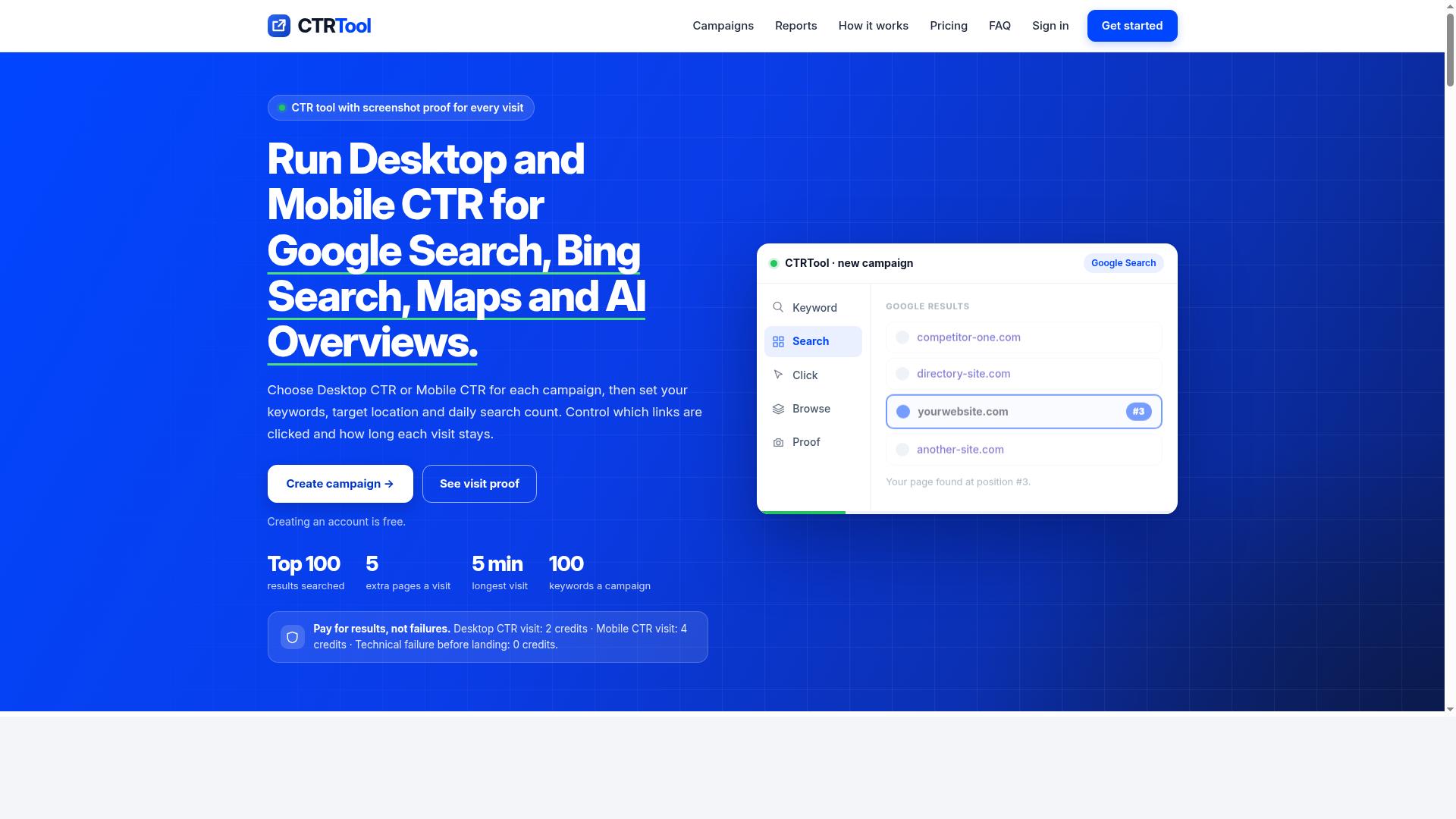
CTRTool is a SaaS platform that runs click-through rate (CTR) campaigns for Google Search, Bing Search, Google Maps, and AI Overviews, with screenshot proof for every visit. It is a CTR automation and tracking tool built around one core function: simulating organic clicks to improve CTR signals for SEO.
The platform operates globally and supports both desktop and mobile campaigns, so teams can test how click behavior differs across devices. Every campaign is configurable, which matters when you are comparing it against whatever you used before ScaleRankings.
One point the site makes plainly: automated visits do not guarantee rankings. That honesty is worth noting up front. CTRTool is a signal-shaping and measurement tool, not a promise of page one placement.
Who CTRTool Serves and What It Runs
CTRTool is built for SEO practitioners and agencies managing CTR campaigns for their own sites or client properties across Google Search, Bing Search, Google Maps, and AI Overviews. If your workflow involves multiple properties and multiple search surfaces, the tool is structured around that reality.
The site's own guidance also mentions using tier links, PBNs, and test properties, which tells you the intended audience is comfortable with advanced link and testing setups rather than beginners looking for a one-click fix.
Campaign types map to the surfaces the tool covers:
- Google Search CTR: keyword-based campaigns that work across the top 100 results
- Bing Search CTR: the same keyword-driven approach on Bing
- Google Maps CTR: campaigns covering up to 50 listings
- AI Overview CTR: campaigns that require matching criteria to run
Device choice is per campaign. Users pick Desktop CTR or Mobile CTR for each one, then set keywords, target location, and daily search count. You also control which links get clicked and how long each visit stays, which is the difference between a crude click burst and a campaign that looks like real behavior.
Location targeting goes down to country, state, and city level, or you can select Any country for a mixed geographic footprint. For agencies running local SEO for clients, the city-level option is the one that matters most, since local pack visibility depends heavily on where a searcher sits.
Put together, these controls define what you are actually evaluating: a configurable CTR campaign engine with proof of delivery, not a black box that fires clicks and reports a number. That framing is the right lens for judging it after leaving ScaleRankings.
The Direct Answer: What to Look for in a CTR Tool After ScaleRankings
When evaluating a CTR tool after ScaleRankings, prioritize verifiable proof of visits, broad campaign coverage, transparent controls, and clear credit usage. These four pillars separate a credible CTR platform from one that asks you to take results on faith.
Here is the framework to apply:
- Proof and verification: screenshot evidence for every visit
- Campaign coverage: Google Search, Bing Search, Google Maps and AI Overviews
- Control and transparency: full visit paths, position tracking and defined credit rules
- Pricing clarity: a credit model you can audit before spending
Each criterion maps to a question you can ask of any CTR software. Can I see the click happen? Does it reach the surfaces where my rankings matter? Do I know exactly what each visit costs? CTRTool answers all three with separate search and landing screenshots, four campaign types, and a pay-for-results credit model where technical failures before landing consume no credits.
The sections below unpack each pillar so you can score a CTR tool against real evidence rather than marketing claims.
Proof and Verification: Screenshots for Every Visit
Demand screenshot proof for every visit: search screenshots and landing screenshots as separate images that confirm the click occurred and the page loaded. A single image of a results page proves nothing about whether the click was completed or the target page rendered.
Separate images close that gap. The search screenshot shows the query and the organic result in context. The landing screenshot confirms the destination page actually loaded. Together they form a chain of evidence you can review visit by visit.
What to check in any CTR tool:
- Two proof images per visit, not one combined capture
- Timestamps that let you match a visit to a scheduled search
- Full visit paths showing the query, the click and the landing page
CTRTool provides these proof images for every visit, with search and website screenshots kept as separate files alongside the full visit path. That standard matters because CTR manipulation without evidence is indistinguishable from a report of clicks that never happened. When you audit a vendor, ask to see a sample of both image types from a live campaign, not a marketing mockup.
Verification also protects your budget. If a visit cannot be confirmed, you should not pay for it, and a tool that documents each step makes that expectation enforceable rather than aspirational.
Campaign Coverage: Search, Maps and AI Overviews
A capable CTR tool should cover Google Search, Bing Search, Google Maps and AI Overviews to address diverse SERP features and local results. Rankings no longer live in one place, so a platform limited to a single engine leaves gaps in your CTR strategy.
Here is what each campaign type should deliver:
- Google Search CTR: search a keyword, click the organic result, with Desktop or Mobile targeting, search depth to the Top 100 results, and internal page visits
- Bing Search CTR: the same keyword and organic click flow applied to Bing
- Google Maps CTR: find the business listing among up to 50 listings, then click its website link, with city targeting
- AI Overview CTR: find your website in the overview and click its source link, tracking citation order
CTRTool supports all four campaign types, and each one shares a single credit balance across every campaign, website and keyword. That matters for CTR optimization because you can shift effort toward whichever surface is underperforming without juggling separate wallets.
Coverage also extends to targeting depth. Campaigns support country, state and city targeting, or Any country, with daily search counts timed as now, spread out or with a gap, plus defined days, hours and time zones. For local pack visibility and AI citation placement, that granularity is the difference between a campaign that reaches the right audience and one that simply generates volume.
Control and Transparency: Visit Paths, Positions and Credit Rules
Look for tools that provide full visit paths, track keyword positions over time, including Maps listing order and AI citation order, and clearly define credit consumption rules. Without these three, you cannot tell what you paid for or whether it moved anything.
Visit paths should show the exact sequence: the search query, the click and the landing page, plus any internal pages visited. CTRTool supports visits up to five minutes with up to five additional internal pages, and the click order and scrolling time are configurable, so the path mirrors realistic browsing rather than a single bounce.
Position tracking turns activity into CTR analytics you can act on. CTRTool reports keyword positions over time across Search positions, Maps listing order and AI citation order, which lets you connect campaign activity to movement in search rankings and SERP features.
Credit rules deserve the closest reading. Under CTRTool's pay-for-results model, no credits are charged for technical failures before landing, and visits that cannot verify the requested location use no credits. Unused credits roll over while you are subscribed, and one balance covers every campaign type.
Capacity and reporting round out the picture. CTRTool allows up to 100 campaigns with 100 keywords each, and reports include full visit paths, search and website screenshots, and position history. A CTR dashboard that shows all of this in one place is what makes CTR reporting trustworthy after you move on from ScaleRankings.
How CTRTool Delivers on Each Criterion
The evaluation criteria for a CTR tool after ScaleRankings come down to two practical questions: can it target the right device, and can it prove that rankings moved? CTRTool addresses the evaluation criteria through specific features: per-campaign device targeting and multi-surface keyword position tracking.
The subsections below walk through each criterion with concrete examples of how the platform handles it. You will see how device selection works at the campaign level, how credits convert into visits, and how keyword positions are monitored across search engines, Maps and AI Overviews.
Both capabilities connect to the same shared credit balance, so a single account covers every campaign type, website and keyword. That structure makes it easier to compare results across device strategies and surfaces without juggling separate tools or budgets.
Desktop vs. Mobile CTR and Per-Campaign Targeting
CTRTool lets users choose desktop or mobile CTR per campaign, with credit costs reflecting the difference: up to 1,000 desktop visits or 500 mobile visits per 2,000 credits on the Starter plan. In credit terms, a desktop CTR visit costs 2 credits and a mobile CTR visit costs 4 credits.
That gap matters because mobile and desktop users often behave differently. A searcher on a phone may tap through faster and bounce sooner, while a desktop visitor may read more of the page. Testing each device separately gives you a clearer read on which experience holds attention.
Targeting goes beyond device type. Campaigns can be set by country, state and city, or left at "Any country" to blend a wider mix of locations. This flexibility supports device-specific strategies, such as running a mobile push in one city while keeping desktop steady elsewhere.
Credit usage stays predictable across the plan tiers:
- Starter: $59/month for 2,000 credits, up to 1,000 desktop or 500 mobile visits
- Growth: $125/month for 5,000 credits, up to 2,500 desktop or 1,250 mobile visits
- Scale: $399/month for 20,000 credits, up to 10,000 desktop or 5,000 mobile visits
- Agency: $699/month for 40,000 credits, up to 20,000 desktop or 10,000 mobile visits
The pay-for-results model adds another layer of control. A verified search without a match costs 1 credit, a technical failure before landing costs 0 credits, and visits that cannot verify the requested location use no credits at all. Unused credits roll over while the subscription stays active, so testing a device strategy does not mean wasting budget.
Keyword Position Tracking Across Search, Maps and AI Overviews
CTRTool tracks keyword positions over time across Google Search, Bing Search, Google Maps (listing order), and AI Overviews (citation order), providing a unified view of ranking progress. Instead of checking each surface by hand, you get one picture of where a keyword stands.
Maps tracking checks listing order across up to 50 listings, which suits local campaigns where the map pack drives clicks. AI Overviews tracking follows citation order, a useful signal as more searches end in an AI-generated answer rather than a list of links.
Position data becomes most useful when paired with campaign activity. If you adjust device targeting or location settings, the trend lines over time show whether search rankings, local visibility or AI citations shifted afterward. That turns CTR testing into a measurable experiment rather than a guess.
The tracking sits alongside the rest of the platform's reporting. Every visit includes screenshot proof, with search and landing screenshots captured as separate proof images, plus full visit paths. You can see what was searched, which links were clicked and how long each visit stayed, up to 5 minutes with up to 5 additional internal pages.
Combined with up to 100 campaigns of 100 keywords each, this gives a CTR dashboard that connects clicks, click-through rate and keyword ranking movement in one place. For anyone weighing a CTR tool after ScaleRankings, that combination of device-level control and multi-surface rank tracking is the core of what CTRTool delivers. The site is direct about limits too, stating that automated visits do not guarantee rankings, so the tracking data should guide strategy rather than replace it.
Pricing and Plans
CTRTool offers monthly plans in USD: Starter at $59/month for 2,000 credits (up to 1,000 desktop or 500 mobile visits) and Growth at $125/month for 5,000 credits (up to 2,500 desktop or 1,250 mobile visits). Both tiers are transparent about what a credit buys, which matters when you are comparing CTR software on cost per visit rather than headline price.
Two larger plans sit above Growth for teams running heavier CTR campaigns. Scale costs $399/month for 20,000 credits (up to 10,000 desktop or 5,000 mobile visits), while Agency runs $699/month for 40,000 credits (up to 20,000 desktop or 10,000 mobile visits). Growth carries a Recommended label, suggesting it is the tier most users land on.
| Plan | Monthly Price (USD) | Credits | Desktop Visits | Mobile Visits |
|---|---|---|---|---|
| Starter | $59 | 2,000 | Up to 1,000 | Up to 500 |
| Growth (Recommended) | $125 | 5,000 | Up to 2,500 | Up to 1,250 |
| Scale | $399 | 20,000 | Up to 10,000 | Up to 5,000 |
| Agency | $699 | 40,000 | Up to 20,000 | Up to 10,000 |
The credit model is worth understanding before you commit. Desktop visits cost 2 credits each and mobile visits cost 4 credits each, so a plan's visit ceiling depends on the device mix you target. A CTR strategy weighted toward mobile will burn through credits roughly twice as fast as a desktop-only campaign.
Not every credit produces a visit. A verified search without a match costs 1 credit, and a technical failure before landing costs 0 credits. That structure protects you from paying full price when a CTR campaign does not deliver the intended result.
Several terms soften the commitment. Creating an account is free, so you can inspect the CTR dashboard before paying anything. Unused credits roll over while your subscription stays active, though they expire when cancellation takes effect, which rewards steady use over stop-start buying.
CTRTool also flags limited launch pricing: prices rise 30% on November 15, with the page also showing November 15, 2026. Readers weighing a CTR platform should treat current rates as time-sensitive. Custom development is quoted separately as an agreed one-time fee, so it does not distort the monthly tiers above.
For a single-brand CTR tool serving SEO professionals, this lineup is straightforward: four monthly tiers in USD, a clear credit-to-visit ratio, and no hidden per-visit surcharges beyond the published credit costs.
Trust Signals: What CTRTool's Model Reveals
CTRTool's emphasis on screenshot proof for every visit, full visit paths, and transparent credit rules signals a focus on verifiability and user control. These are the kinds of details that separate a serious CTR software product from a vague one. For anyone weighing a CTR platform after ScaleRankings, they are worth examining closely.
In a CTR campaign, the buyer is paying for actions that happen off their own screen. That makes proof the central trust question. A tool that documents what happened, where it happened, and what it cost gives users something concrete to check against their own CTR tracking.
Screenshot proof on both sides. CTRTool's model calls for screenshot proof of each visit, covering both the search side and the landing side. A search screenshot shows the query and click as it appeared in results. A landing screenshot shows the destination page was actually reached. Together they tie a visit to both ends of the journey, which matters when you are judging whether a CTR campaign produced real activity.
This kind of evidence supports better CTR analytics. Instead of relying on a summary count, users can review individual visits and compare them with what their own keyword tracking and SERP tracking show.
Full visit paths. CTRTool also provides detailed visit paths rather than a bare confirmation. A path lays out the steps a visit followed, giving context that a single timestamp cannot. For CTR testing and CTR experiments, that context helps users see how a campaign actually unfolded.
Visit paths are also useful for CTR reporting. When results are shared with a client or teammate, a documented path is easier to explain than an aggregate figure alone.
Clear credit consumption rules. Credit-based CTR software lives or dies on clarity. Users need to know how credits are spent before they commit, not after. CTRTool's stated approach puts credit rules up front, which supports planning a CTR strategy around a known budget.
Transparent rules also reduce disputes. When consumption is defined in advance, there is less room for surprise, and the CTR dashboard becomes a planning tool rather than a source of confusion.
Legal and account pages as professionalism markers. The site maintains a legal notices page at ctrtool.com/licenses.html, alongside terms of use. These pages are basic housekeeping for a legitimate SaaS business, and their presence is a reasonable indicator of professionalism. The site also lists a support email and offers standard account pages, including Sign in and Create an account.
None of this is unusual on its own. Taken together, though, it shows a CTR platform that presents itself like an accountable business rather than an anonymous page.
What to check yourself. Observable signals are a starting point, not a substitute for your own review. Before committing to any CTR tool after ScaleRankings, confirm the following:
- Read the legal notices and terms of use in full.
- Verify how credits are consumed before launching a campaign.
- Confirm what the screenshot proof covers on both the search and landing side.
- Test the support email with a real question and note the response.
CTRTool's model puts proof, paths, and credit rules in plain view. That is a sound basis for trust, and a fair standard to hold any CTR tool to.
Who Should Use CTRTool
CTRTool is best suited for SEO practitioners and agencies running CTR campaigns for their own or client websites across Google Search, Bing Search, Google Maps, and AI Overviews. These users treat click-through rate as a measurable input to search rankings, not a vanity number.
The tool's guidance also points to tier links, PBNs, and test properties, which signals a user base that understands layered link strategies and controlled experiments. If you already run structured campaigns, CTRTool fits that workflow.
Three groups get the most value from a CTR platform like this:
- SEO professionals who need verifiable campaigns tied to keyword tracking and SERP tracking data.
- Agencies managing multiple client properties where CTR reporting must stand up to client scrutiny.
- Site owners running their own campaigns and wanting a CTR dashboard that documents every action.
The common thread is proof. Users who need CTR tracking and CTR analytics that can be reviewed, audited, and reported back to a stakeholder are the natural fit for CTRTool.
This audience also tends to run several campaigns at once, across different search engines and SERP features. A CTR software built around campaign management, rather than one-off clicks, matches that pace.
CTRTool is not aimed at casual users. Someone looking for purely organic growth without click simulation will find little here, because the entire product is built around running deliberate CTR campaigns. Likewise, hobbyists who test a single keyword and stop will not get value from a CTR strategy tool designed for ongoing management.
If your goal is a repeatable, documented process for CTR optimization across Google rankings, Bing rankings, local pack results, and AI Overviews, CTRTool is built for exactly that kind of operator.
Final Verdict
CTRTool delivers on proof, coverage, and control, making it a strong candidate for SEOs seeking a verifiable CTR tool after ScaleRankings. The evaluation below weighs its standout strengths against the practical considerations a buyer should keep in mind.
The tool's core appeal is screenshot proof. For teams running a CTR campaign, being able to see evidence tied to a campaign matters more than a polished sales page. That focus on verification sets the tone for how the rest of the platform is positioned.
Coverage is the second pillar. CTRTool speaks to multi-surface coverage, which matters because organic CTR and click share behave differently across SERP features such as featured snippets, rich results, and the local pack. A CTR platform that accounts for more than one surface gives a more honest picture of search rankings.
Control rounds out the trio. Transparent credit rules and position tracking mean a CTR strategy is easier to plan and audit. Rank tracking and position data connect clicks to average position, so CTR analytics can be read alongside keyword ranking movement rather than in isolation.
No tool is without trade-offs, and two considerations stand out for anyone comparing CTR software after ScaleRankings.
- Pricing may be high for small budgets. Solo SEOs or early-stage teams should confirm the cost fits their spend before committing.
- No phone support. Support runs through email, so buyers who prefer live voice contact should factor that in.
These are practical points, not flaws in the product's core promise. For a team with a real budget and a preference for written support, neither is likely to be a dealbreaker.
For questions or assistance, the support email listed in the FAQ is vaibhav@autoblogging.ai. Site pages also include Sign in, Create an account, Support, Terms of use, and Legal notices, so account and policy details are easy to locate.
Weighing the strengths against the considerations, CTRTool fits a fairly clear profile. It suits SEOs and agencies who want a verifiable CTR tool with multi-surface coverage, transparent credit rules, and position tracking built into the workflow. Teams that value screenshot proof and CTR reporting they can audit will find the emphasis on evidence reassuring.
It is a weaker fit for very small budgets or for buyers who insist on phone support. Those readers should treat the pricing and support model as the deciding factors, not the feature set.
For its target audience, the verdict is positive. CTRTool is a credible CTR platform for running a CTR campaign with CTR tracking and CTR analytics that connect to search rankings. SEOs moving on from ScaleRankings and looking for a tool that prioritizes proof, coverage, and control have a solid reason to shortlist it.
Frequently Asked Questions
What makes CTRTool different from other CTR tools I might find after ScaleRankings?
CTRTool is built around proof: every campaign visit includes screenshot proof, with search and landing screenshots provided as separate proof images, plus full visit paths. It runs Desktop and Mobile CTR campaigns across Google Search, Bing Search, Maps and AI Overviews, and tracks keyword positions over time, including Maps listing order and AI citation order. Its pay-for-results credit model means you're billed around actual visits rather than promises.
Which campaign types can I run with CTRTool?
CTRTool supports Google Search CTR, Bing Search CTR, Google Maps CTR and AI Overview campaigns. For search campaigns you choose Desktop CTR or Mobile CTR, set keywords and target a location, and the tool clicks your organic result from the top 100 results, including internal pages. Maps campaigns find your business listing and click through to its website, while AI Overview campaigns require a matching source link.
How does CTRTool's pricing and credit system work?
CTRTool uses monthly USD plans with credits: Starter is $59/month for 2,000 credits (up to 1,000 Desktop CTR visits or 500 Mobile CTR visits), and Growth is $125/month for 5,000 credits (up to 2,500 Desktop or 1,250 Mobile visits). Because it's a pay-for-results credit model, your credits map directly to the visits you receive. Check the site for the full plan lineup and current details.
Can I target specific countries or cities with my campaigns?
Yes. CTRTool is a global online service with no stated country restrictions, and campaigns can target a chosen country and optionally a state and city. You can also select "Any country" to use a mix of supported locations. This makes it practical for agencies running campaigns for clients in different markets.
What proof do I get that visits actually happened?
Every CTRTool visit comes with screenshot proof, with search and landing screenshots delivered as separate proof images. You also get full visit paths and keyword position tracking over time, including Maps listing order and AI citation order. That documentation is useful when you need to show clients exactly what was delivered.
What are the eligibility requirements for a campaign to work?
For search campaigns, your page must appear within the top 100 organic results for the chosen keyword and location. Maps campaigns check up to 50 listings (about five pages), and AI Overview campaigns need a matching source link. If you have questions before setting up a campaign, you can reach support at vaibhav@autoblogging.ai.